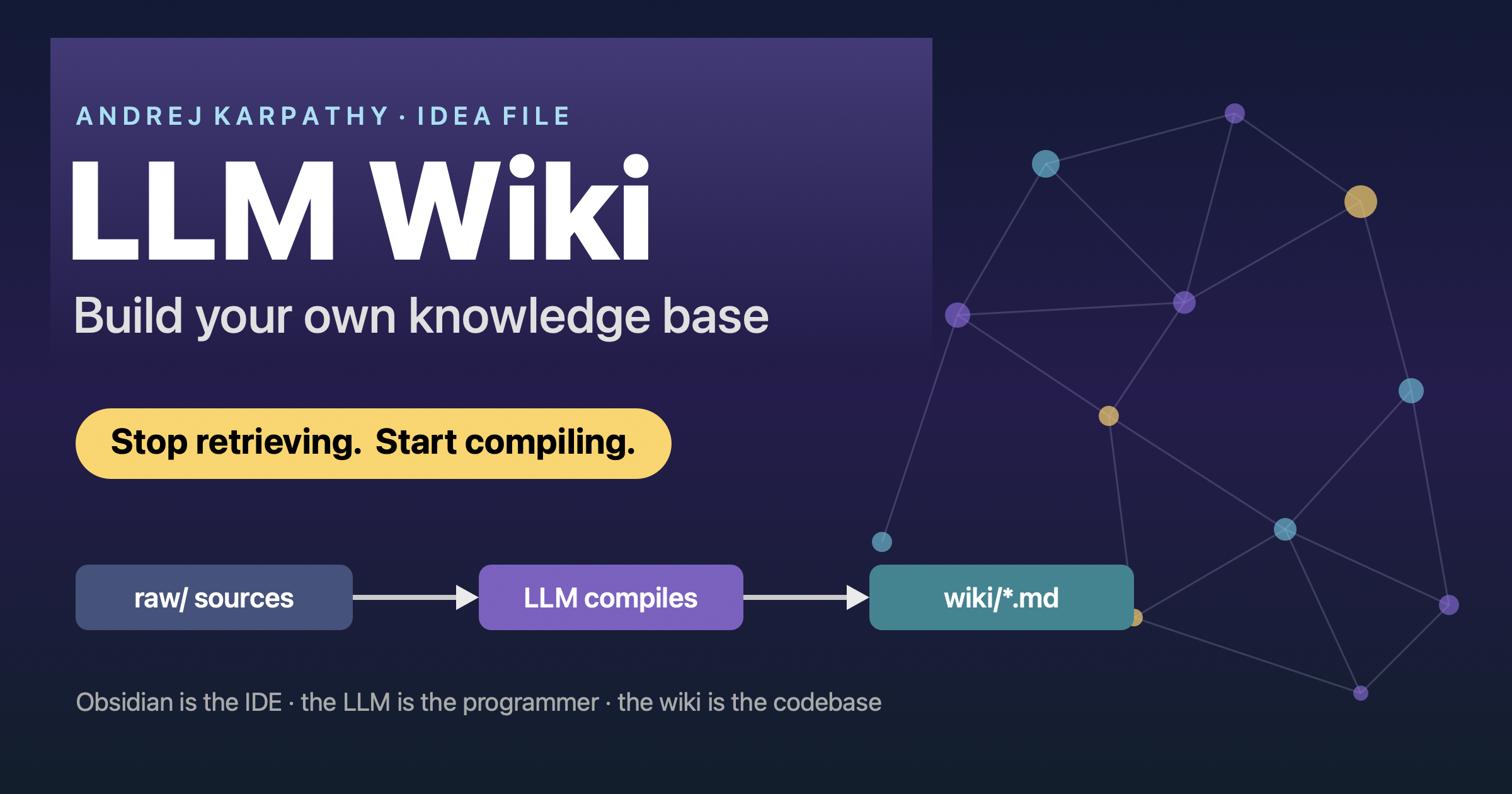
Karpathy’s LLM Wiki: Build Your Own Knowledge Base
Andrej Karpathy recently shared a simple but powerful pattern for managing knowledge with LLMs. It is not a product or a library — it is an idea file: a single Markdown document you paste into any coding agent (Claude Code, OpenAI Codex, pi/OpenCode, …) and let the agent build and maintain a personal wiki for you.
- Original gist: LLM Wiki
- Walkthrough this post is based on: Andrej Karpathy’s LLM Wiki
The core idea: stop retrieving, start compiling
Most “chat with your documents” tools are RAG: they search your files at query time and reassemble an answer from fragments every single time. Nothing accumulates.
Karpathy flips this: the LLM compiles your raw sources once into a wiki and keeps it updated.
| Software engineering | LLM Wiki |
|---|---|
| Source code → compiled once → binary | Raw sources → compiled by the LLM → wiki |
| Binary runs fast every time | Wiki is pre-synthesized and always ready |
The wiki is a persistent, compounding artifact: summaries, cross-references and contradictions are already there. You rarely write the wiki — the LLM does the bookkeeping.
“Obsidian is the IDE; the LLM is the programmer; the wiki is the codebase.”
Three layers
- Raw sources — your curated PDFs, articles, notes. Immutable: the LLM reads them but never edits them. They remain the source of truth.
- The wiki — a folder of Markdown files (entity pages, concept pages, summaries) owned entirely by the LLM.
- The schema — an
AGENTS.md(orCLAUDE.md) file that tells the agent how the wiki is structured and how to ingest, query and lint it.
Three operations
- Ingest — drop a source, and the LLM reads it and updates 10–15 pages: a summary, the index, entity pages, links, and any contradictions.
- Query — ask a question; the LLM reads the already-synthesized wiki and answers with citations. Good answers get filed back as new pages, so they are not lost in chat history.
- Lint — a periodic health check: contradictions, orphan pages, stale claims, missing cross-links.
Two files that hold it together
index.md— a catalog of every page (link + one-line summary). The LLM reads it first to find relevant pages before drilling in.log.md— an append-only history of ingests and queries. Use a consistent prefix such as## [2026-09-24] ingest | Titlesogrep "^## \[" log.md | tail -5shows the latest activity.
Build one in minutes
mkdir llm-wiki && cd llm-wiki
mkdir raw
- Open your agent in that folder.
- Paste the gist and say: “Set up an LLM Wiki here. First ask me what it is about and what sources I will feed it, then write the schema.”
- Answer a few questions (topic, source types, page types).
- Drop a source in
raw/and say: “Ingest raw/bitter-lesson.pdf” — the agent generates the summary, updates the index, and creates linked pages. - Ask synthesis questions such as: “How do these two authors agree and disagree?”
- Open the folder in Obsidian and look at the graph view.
Tools
- Obsidian — the viewer and graph: see your wiki as a network of linked notes instead of a flat folder.
- Obsidian Web Clipper — a browser extension that saves any web article to Markdown, straight into your
raw/folder. The fastest way to feed new sources.
RAG vs LLM Wiki
- RAG — best for huge, changing corpora and precise chunk citations. Stateless: every query starts from scratch.
- LLM Wiki — best for a curated corpus (roughly 100–500 sources) and deep work where synthesis matters more than retrieval. Stateful: knowledge compounds.
One real risk: a wrong summary can get “baked in” as fact and quietly propagate across linked pages. Mitigate it with the lint step and an occasional spot-check against the raw source.
Why it matters
The hard part of a knowledge base was never reading or thinking — it is the bookkeeping: links, summaries, keeping claims current. LLMs do that for free, which is why humans usually abandon wikis. It also makes Vannevar Bush’s 1945 Memex vision finally practical: the connections between documents become as valuable as the documents themselves.

Use the share button below if you liked it.
It makes me smile, when I see it.