A Practical Local Coding Workstation: LM Studio, Qwen2.5-Coder, and Pi
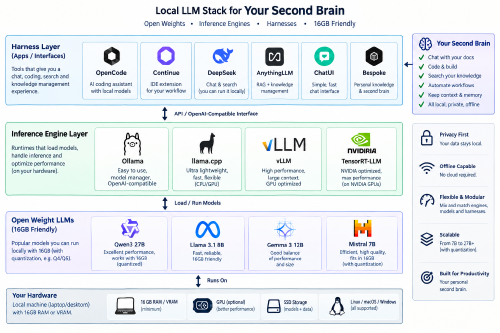
In the Local Second Brain post I described the architecture of a privacy-first local intelligence layer. That was the why. This is the how.
Here is a concrete, copy-paste recipe for turning a 16GB Apple Silicon Mac into a fully offline coding agent — no API keys, no telemetry, no per-token billing. Just an LLM that reasons about your codebase, edits files, and runs commands, all on your own machine.
The stack in one line
| Component | Role |
|---|---|
| LM Studio | Local inference engine with a GUI and an OpenAI-compatible server |
| Qwen2.5-Coder-7B-Instruct | The coding model — best-in-class at a size that fits ~14GB |
| n-gram speculative decoding | A zero-cost trick to roughly double generation speed on code |
| Pi | The agentic harness that turns the model into a coding agent |
Hardware reality check
On a 16GB unified-memory Mac, macOS and your apps take roughly 2GB, leaving ~14GB for the model and its context window. That budget drives every choice below. Here is how the relevant coding models look after 4-bit quantization:
| Model | Params | 4-bit size | Fits in ~14GB? |
|---|---|---|---|
| Qwen2.5-Coder-0.5B / 1.5B | 0.5B / 1.5B | <1GB | ✅ also useful as draft models |
| Qwen2.5-Coder-7B-Instruct | 7.6B | ~4.7GB | ✅ comfortable — the daily driver |
| Qwen2.5-Coder-14B-Instruct | 14.7B | ~9GB | ✅ tight — quality mode, shorter context |
| Qwen3-Coder-30B (MoE) | 30B (3B active) | ~18GB | ❌ needs more memory |
The sweet spot is Qwen2.5-Coder-7B-Instruct: it is among the strongest open coding models in its size class, holds a 32k context window, handles tool calls well, and leaves plenty of headroom. Keep the 14B around for architecture-level reasoning when speed matters less.
Step 1 — Install and configure LM Studio
Download LM Studio from lmstudio.ai and install the macOS app. On Apple Silicon it ships with the MLX backend by default, which is the right choice for M-series chips (it also offers a llama.cpp runtime if you ever need it).
Three settings to verify after install:
- Runtime: MLX (Apple Silicon).
- Context length:
32768for the 7B,16384for the 14B. - GPU offload: max — MLX uses unified memory automatically, so there is nothing to tune manually.
Step 2 — Download the models
In LM Studio’s search, look up and download:
Qwen2.5-Coder-7B-Instruct— choose the MLX 4-bit (or GGUFQ4_K_M) quantization.Qwen2.5-Coder-1.5B-Instruct(or the 0.5B) — a tiny draft model for speculative decoding in Step 4.
Two models, both offline after the first download. Total footprint on disk is roughly 6GB.
Step 3 — Start the local OpenAI-compatible server
Load the 7B model, then open Developer → Local Server and click Start Server. LM Studio listens on port 1234 by default and speaks the OpenAI chat-completions protocol:
curl http://localhost:1234/v1/models
You should see the loaded model listed with its exact ID (e.g. qwen2.5-coder-7b-instruct). Note that ID — you will need it verbatim in Step 5.
Step 4 — Make it fast with n-gram speculative decoding
The bottleneck on a memory-bound Mac is tokens per second. Speculative decoding sidesteps it: a cheap model proposes a few candidate tokens, and the main model verifies them in a single forward pass. Output quality is identical, but wall-clock speed can double or triple.
The n-gram flavour of this idea skips the second model entirely. Instead of a draft model, it builds an n-gram index of the prompt and recent history, then proposes tokens by matching repeated sequences. This works exceptionally well on code, because code is full of repetition — identifiers, boilerplate, indentation, closing braces — so n-gram lookup can predict long runs with near-zero cost.
Two ways to put this into practice:
- In LM Studio — enable Speculative Decoding and select the 1.5B model as the draft model. This is the supported, one-click option.
- In llama.cpp — prompt-lookup decoding implements the n-gram approach directly (no draft model, no extra memory), and is worth trying if you switch Pi to the llama.cpp router later.
Start with LM Studio’s draft-model approach; it is the least fiddly and gives most of the benefit.
Step 5 — Wire Pi in as the harness
LM Studio hosts the model; Pi does the actual work — reading files, editing code, running commands, and orchestrating multi-step tasks. Connect the two through Pi’s models.json:
{
  "providers": {
    "lmstudio": {
      "baseUrl": "http://localhost:1234/v1",
      "api": "openai-completions",
      "models": [
        { "id": "qwen2.5-coder-7b-instruct" }
      ]
    }
  }
}
Save it to ~/.pi/agent/models.json (user-level) or .pi/models.json (per-project). A few notes:
- The
idmust match what/v1/modelsreported in Step 3. - No
apiKeyis needed — LM Studio’s local server has no authentication. - Add a second entry for
qwen2.5-coder-14b-instructif you want both available in the picker.
Then launch Pi and pick the model:
pi
/model          # select the LM Studio model
Ctrl+P cycles between configured models, and /thinking adjusts reasoning effort. That’s the whole harness wiring — no /login, no cloud provider.
Step 6 — A real working session
With the model loaded and Pi connected, use it like any coding agent, but keep a few local-model habits:
- Temperature 0.1–0.3 for code (lower = more deterministic).
- Give it context — point Pi at the file or directory, and lean on
AGENTS.mdfor project conventions. - Start small — 7B models excel at focused edits, not 10-file rewrites. Break big tasks into steps.
Practical prompts that work well at this size:
Refactor src/auth/login.ts to extract the validation logic into a separate function.
Write unit tests for the functions that changed in the last commit, following the existing test style.
Explain what this function does and flag any edge cases it misses.
Because everything runs locally, nothing leaves the machine — useful when the codebase is proprietary or under NDA.
Tuning cheat-sheet
| Symptom | Fix |
|---|---|
| Out of memory / crashes | Lower the context length, or switch 14B → 7B |
| Slow responses | Enable speculative decoding; use the 7B for quick edits and the 14B only for hard problems |
| Repetitive or rambling output | Raise repeat penalty, lower temperature, or shorten context |
Model not visible in /model | Check the id in models.json matches /v1/models, and that the server is running |
Closing
A capable, fully offline coding agent now fits on a base-model MacBook Air. The recipe is three moving parts: LM Studio serves a quantized Qwen2.5-Coder model, n-gram speculative decoding keeps it fast, and Pi turns it into an agent that actually edits your project.
No cloud, no subscription, no data leakage. Install it once, and you have a private coding teammate that improves as open-weight models do.


Use the share button below if you liked it.
It makes me smile, when I see it.